
I’ve been a homelab hater for a long time.
OK, that’s not technically true. I don’t actually hate the idea of a homelab, and I think that they’re a nice way to practice certain things that might be expensive otherwise. I recognize that it’s a fine hobby, and it’s good for people to have hobbies. It’s just not my hobby.
My actual gripe is with the crowd that thinks all tech professionals must have a homelab, and if you don’t you aren’t dedicated enough, or you aren’t committed to learning outside work, or other related nonsense. Especially in the modern day of software-defined everything. If you’re doing something that is truly solely hardware focused, fine. But for everyone else, I suspect that the Homelab Truther people are either stuck in old ways, or (even worse) conflating their love for their hobby with an actual requirement.
My gripes aside, I do need a place to host my personal projects. Hosting them on my dev machine isn’t ideal, because I’d like to be able to access stuff outside the house, and I don’t want to open ports from the outside to my “daily driver”. Also, I need that RAM for Call of Duty. I have some spare hardware lying around from old desktops and such, so why not?
The Goal
Let’s be clear: I’m not doing this because I’m worried about “privacy”. I have this whole other body of opinions about why most people’s personal threat models on privacy and cybersecurity are wrong (especially in the cyber community) that I’m sure I’ll write about some other time.
My main goal is to have an environment where I can host my personal projects for my personal use, outside of my desktop PC. I’d like to be able to add and remove “services” at will, without having to do much ops work, in a way where services are isolated and don’t affect/crowd each other. For me, that means using Kubernetes (k8s) and Docker. Luckily, I already use them every day in production, so I know which parts I actually want and what I can ignore. This will be important later.
The Metal
I have an old Dell Precision T3500 lying around. I think it was produced in 2010. At some point I put an SSD and an updated (relatively speaking) graphics card in it, but other than that, it’s the original hardware. And it’s gonna work great.
I’m not using anything else. No NAS/NFS, no other nodes, nothing. This is where the homelab people start to call me names. This isn’t a passion project for its own sake, it’s a means to an end.
The Design
Those of you who are familiar with k8s will notice that typically, you want at least two nodes for k8s to take advantage of all its fault-tolerance and high availability features. This is one of those things I’m going to ignore that I mentioned before, because I don’t care about HA for this use case — it’s just for me!
I’m going to use minikube to manage k8s for me. It’s designed to run on a local dev machine, so it’s perfect for this use case. I’m also going to Dockerize any apps I write for personal projects I intend to host. My router will have a statically-assigned DHCP reservation for the server. I considered using microk8s because I am using Ubuntu, but it’s stuck behind snap, and I’m not going there.
That’s it! I don’t need anything fancy here.
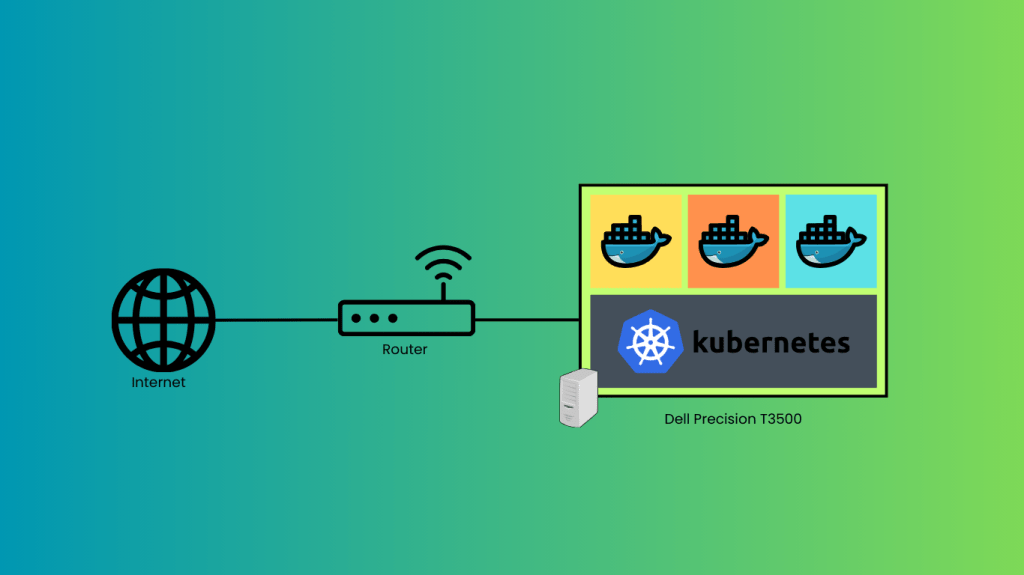
Let’s do some Kubernetes
I did a fresh install of Ubuntu Server 24.04 LTS on the Dell. The first thing I did was get its network connection up, and set up SSH.
Next up, set up minikube. Installing it is pretty easy:
$ curl -LO https://storage.googleapis.com/minikube/releases/latest/minikube_latest_amd64.deb
$ sudo dpkg -i minikube_latest_amd64.deb
Then I started minikube, and….
$ minikube start
😄  minikube v1.34.0 on Ubuntu 24.04
👎  Unable to pick a default driver. Here is what was considered, in preference order:
    ▪ docker: Not healthy: "docker version --format {{.Server.Os}}-{{.Server.Version}}:{{.Server.Platform.Name}}" exit status 1: permission denied while trying to connect to the Docker daemon socket at unix:///var/run/docker.sock: Get "http://%2Fvar%2Frun%2Fdocker.sock/v1.24/version": dial unix /var/run/docker.sock: connect: permission denied
    ▪ docker: Suggestion: Add your user to the 'docker' group: 'sudo usermod -aG docker $USER && newgrp docker' <https://docs.docker.com/engine/install/linux-postinstall/>
💡  Alternatively you could install one of these drivers:
    ▪ kvm2: Not installed: exec: "virsh": executable file not found in $PATH
    ▪ podman: Not installed: exec: "podman": executable file not found in $PATH
    ▪ qemu2: Not installed: exec: "qemu-system-x86_64": executable file not found in $PATH
    ▪ virtualbox: Not installed: unable to find VBoxManage in $PATH

❌  Exiting due to DRV_NOT_HEALTHY: Found driver(s) but none were healthy. See above for suggestions how to fix installed drivers.
Oops! I forgot to install Docker. Let’s fix that:
$ sudo apt install curl apt-transport-https ca-certificates software-properties-common

$ curl -fsSL https://download.docker.com/linux/ubuntu/gpg | sudo gpg --dearmor -o /usr/share/keyrings/docker-archive-keyring.gpg

$ echo "deb [arch=$(dpkg --print-architecture) signed-by=/usr/share/keyrings/docker-archive-keyring.gpg] https://download.docker.com/linux/ubuntu $(lsb_release -cs) stable" | sudo tee /etc/apt/sources.list.d/docker.list > /dev/null

$ sudo apt update && sudo apt install docker-ce

$ sudo usermod -aG docker $USER && newgrp
I had to install from Docker’s package mirror because the Ubuntu one doesn’t have the latest version.
Now let’s try that again:
$ minikube start
😄  minikube v1.34.0 on Ubuntu 24.04
✨  Automatically selected the docker driver
📌  Using Docker driver with root privileges
👍  Starting "minikube" primary control-plane node in "minikube" cluster
🚜  Pulling base image v0.0.45 ...
💾  Downloading Kubernetes v1.31.0 preload ...
    > preloaded-images-k8s-v18-v1...:  326.69 MiB / 326.69 MiB  100.00% 5.68 Mi
    > gcr.io/k8s-minikube/kicbase...:  487.89 MiB / 487.90 MiB  100.00% 4.52 Mi
🔥  Creating docker container (CPUs=2, Memory=2900MB) ...
🐳  Preparing Kubernetes v1.31.0 on Docker 27.2.0 ...
    ▪ Generating certificates and keys ...
    ▪ Booting up control plane ...
    ▪ Configuring RBAC rules ...
🔗  Configuring bridge CNI (Container Networking Interface) ...
🔎  Verifying Kubernetes components...
    ▪ Using image gcr.io/k8s-minikube/storage-provisioner:v5
🌟  Enabled addons: storage-provisioner, default-storageclass
💡  kubectl not found. If you need it, try: 'minikube kubectl -- get pods -A'
🏄  Done! kubectl is now configured to use "minikube" cluster and "default" namespace by default

$ minikube kubectl -- get po -A
NAMESPACE     NAME                               READY   STATUS    RESTARTS   AGE
kube-system   coredns-6f6b679f8f-zl45g           1/1     Running   0          89s
kube-system   etcd-minikube                      1/1     Running   0          94s
kube-system   kube-apiserver-minikube            1/1     Running   0          94s
kube-system   kube-controller-manager-minikube   1/1     Running   0          94s
kube-system   kube-proxy-kwjn4                   1/1     Running   0          89s
kube-system   kube-scheduler-minikube            1/1     Running   0          95s
kube-system   storage-provisioner                1/1     Running   0          93s
Much better.
Now I’ll make a test echo service to make sure it can actually host services and I can talk to them internally.
First, to create the service. I’m using the recommended echo service as an example:
$ minikube kubectl -- create deployment hello-minikube --image=kicbase/echo-server:1.0

$ minikube kubectl -- expose deployment hello-minikube --type=NodePort --port=8080
Now, since I want to be able to access my services outside this machine (and outside of the k8s cluster itself, first), I need to set up an ingress controller. The ingress controller will act as a sort of firewall (mine will be NGINX though), deciding what traffic to route to which services, and what to drop. I need to enable the Ingress addon, and configure the Ingress.
$ minikube addons enable ingress

$ vim ingress.yml
apiVersion: networking.k8s.io/v1
kind: Ingress
metadata:
  name: example-ingress
  annotations:
    nginx.ingress.kubernetes.io/rewrite-target: /
spec:
  ingressClassName: nginx
  rules:
  - http:
      paths:
      - path: /
        pathType: Prefix
        backend:
          service:
            name: hello-minikube
            port:
              number: 8080

$ minikube kubectl -- apply -f ingress.yml
ingress.networking.k8s.io/example-ingress configured

$ minikube kubectl -- get ingress
NAME              CLASS   HOSTS   ADDRESS        PORTS   AGE
example-ingress   nginx   *       192.168.49.2   80      16m

$ curl http://192.168.49.2
Request served by hello-minikube-7d48979fd6-2g5bn

HTTP/1.1 GET /

Host: 192.168.49.2
Accept: */*
User-Agent: curl/8.5.0
X-Forwarded-For: 192.168.49.1
X-Forwarded-Host: 192.168.49.2
X-Forwarded-Port: 80
X-Forwarded-Proto: http
X-Forwarded-Scheme: http
X-Real-Ip: 192.168.49.1
X-Request-Id: 186b314c9f05427024d68fa4deef510d
X-Scheme: http
OK, that’s working, and now I can access services from outside the cluster, but not from outside the host machine. That’s because the IP of the cluster ingress is on a different (bridged) subnet than my physical local network. In production we could do DNS shenanigans to deal with that, but here I’m going to just put an NGINX proxy on the host OS to forward to the cluster ingress IP and move on. (Yes, that’s 2 layers of NGINX between the outside network and my services. It’s fine.)
So let’s set up a super-simple NGINX reverse proxy:
$ sudo apt install nginx

$ sudo vim /etc/nginx/sites-available/default
server {
        listen 80 default_server;
        listen [::]:80 default_server;

        location / {
                proxy_pass http://192.168.49.2/;
        }
}

$ sudo systemctl restart nginx
That’s it! Now, if I go to the external IP of the Dell from another device on my network, I get the same response from my echo service as I did locally. Cool!
Later on I’ll set up Letsencrypt for HTTPS, and I’ll add an actual service from a personal project. I’ll also set up port forwarding to send traffic from the Internet to my services when I decide I need to.
Well, that was actually pretty straightforward. I don’t need anything fancy, and probably never will, so this is plenty good enough. And it was free!
 Code, Deploy, Repeat | Austin Jones